Key Takeaways
This guide summarizes the key buying criteria, comparison points, and standout models for this category.
Finding the perfect remote control can transform your home entertainment experience—making every button press smoother and every device interaction more reliable. In this buying guide, we explore the Remote Controls category, diving into top models for TVs, home theater systems, streaming devices, and smart home setups. From brand-specific replacements to multi-device universal remotes, this comparison will help you identify options with the best compatibility, real-world reliability, and top customer ratings. Whether you need a replacement for a lost TV remote, want to simplify your smart home audio setup, or upgrade to a multi-device controller, we've collected the details and user insights you need to make an informed purchase.
Key Takeaways
- Match compatibility by TV or device brand: choose remotes designed for your specific brand or a universal model for multiple devices.
- Consider user feedback: models like the Insignia™ - Fire TV Replacement Remote for Insignia-Toshiba-Pioneer earned high satisfaction with over 1,900 positive reviews.
- Price points for every budget: great options start around $15 for basics to $69 for premium smart remotes—compare for the best value.
Top Picks
#1
Best Overall
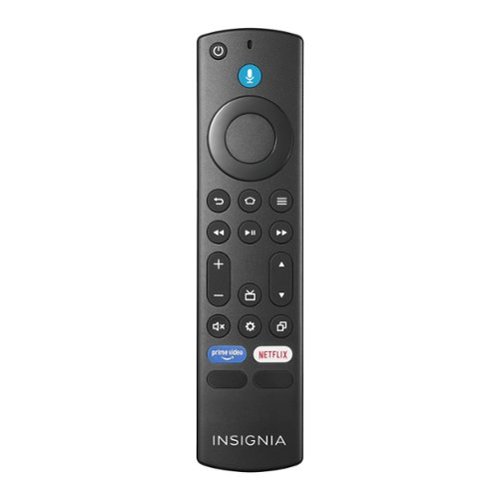
With a strong 4.7-star rating and over 1,900 shopper reviews, this remote is praised for its seamless pairing, intuitive button layout, and reliable compatibility with Fire TV editions. Most users note that setup takes just a few moments and performance matches (or beats) the original remote.
$29.99
★ 4.6/5
1,933 ratings
- Top-rated for ease of use and rapid setup
- Designed specifically for Insignia, Toshiba, and Pioneer Fire TVs
#2
Best for Samsung TVs
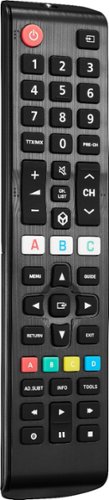
This replacement remote is trusted by nearly 2,000 customers with a 4.6-star average. Shoppers consistently mention its plug-and-play convenience and impressive build quality, making it a reliable direct replacement for lost or broken Samsung remotes. Backed by shopper feedback with a 4.6/5 rating across 1,977 reviews.
$34.99
★ 4.6/5
1,977 ratings
- Excellent Samsung TV compatibility
- No programming needed; batteries included
#3
Best Budget Universal
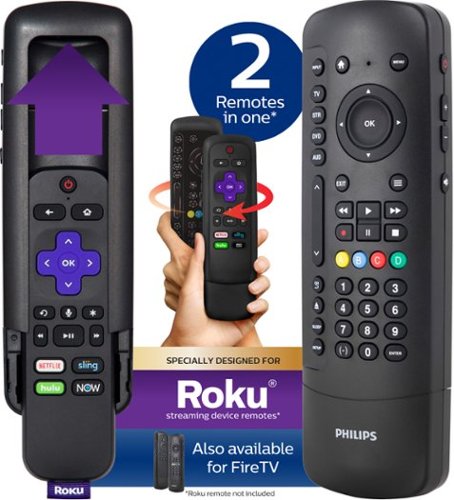
A value pick for controlling up to four devices, this Philips universal remote appeals to shoppers seeking affordability and flexibility. While some users comment on a lower rating (3.8 from 321 reviews), most appreciate its versatile function for TVs, DVD players, and Rokus.
$19.99
★ 3.8/5
321 ratings
- Works across multiple device brands
- Budget-friendly option for secondary rooms
#4
Best for Smart Home Audio
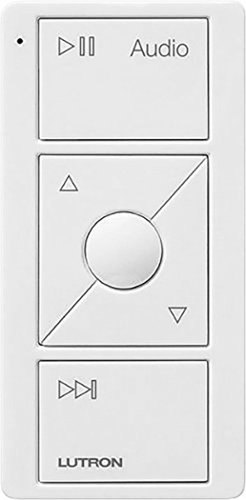
For those seeking smart home audio controls, this Lutron Pico remote (4.3 from 16 reviews) is known for its streamlined Sonos compatibility. Users highlight its tactile feel and the convenience of wireless multi-room audio control.
$49.95
★ 4.3/5
16 ratings
- Seamless integration with Sonos audio systems
- Wireless, long-range performance
#5
Best for LG TVs
A favorite among LG owners, this Insignia remote holds a 4.5 rating from 794 reviews, earning praise for precise compatibility and quick setup. Many customers recommend it as a direct swap for lost or worn out LG TV remotes.
$34.99
★ 4.6/5
794 ratings
- Tailored specifically for LG TVs
- Simple plug-and-play setup
Comparison Table
| Model |
Best For |
Price |
Key Strength |
| Insignia™ - Fire TV Replacement Remote for Insignia-Toshiba-Pioneer - Black |
Fire TV Editions (Insignia, Toshiba, Pioneer) |
$29.99 |
High user ratings, fast setup |
| Insignia™ - Replacement Remote for Samsung TVs - Black |
Samsung TV Owners |
$34.99 |
Reliable direct replacement, nearly 2,000 positive reviews |
| Philips - 4 Device Universal Remote Control Roku - Black |
Multi-brand households |
$19.99 |
Controls up to 4 devices, budget-friendly |
| Lutron - Caseta Wireless Pico Smart Remote for Audio, Works with Sonos - White |
Smart home audio, Sonos systems |
$49.95 |
Wireless audio control, works with Sonos |
| Insignia™ - Replacement Remote for LG TVs - Black |
LG TV Owners |
$34.99 |
Easy setup, strong LG compatibility |
How To Choose
Which type of remote is right for your devices?
First, confirm which devices you want to control. Replacement remotes are designed for specific TV brands and models, ensuring plug-and-play set up with familiar layouts. Universal remotes, such as the Philips - 4 Device Universal, can manage multiple brands (TVs, Roku, DVD players, soundbars) but may require programming codes. For smart home enthusiasts, look for models compatible with systems like Sonos or smart lighting. Matching your usage needs and environment helps you select the right remote type.
If you aren’t sure about compatibility, check your device’s manual or look up the remote’s supported brands before buying.
What features and functions matter most?
Essential features include clear button labels, comfortable grip, and responsive IR or wireless signals. Some remotes add voice controls, backlighting, or programmable buttons. Prioritize those design elements that address your everyday frustrations—like lost remotes or difficulty switching inputs. If you often use streaming services, models designed for Roku or Fire TV editions (such as the Insignia Fire TV remote) can simplify your experience.
Remotes with direct access buttons for apps (Netflix, Hulu, etc.) can be especially handy if you’re a heavy streamer.
How important are user ratings and reliability?
High review counts and strong star ratings suggest reliable performance and broad customer satisfaction. The most recommended remote controls, such as the Insignia™ models for Samsung and Fire TV, have 1,900+ positive reviews. Read feedback for clues about ease of pairing, real-world durability, and battery life. If a remote is repeatedly flagged for setup issues or compatibility gaps, consider alternatives.
Look for customer photos or videos in reviews to confirm the remote’s look and ease of use.
How do price and warranty factors affect your choice?
Remote controls are available at various price points—from basic replacements under $20 to premium smart home controls over $50. More expensive models usually add advanced features or broader device compatibility. Most reputable brands offer limited warranties, so check coverage, especially for pricier remotes.
Balance your budget with frequency of use: everyday remotes may justify a slightly higher investment for lasting durability.
FAQ
Will a universal remote work with my smart TV?
Most universal remotes can be programmed to operate a wide variety of smart TVs, but it’s essential to check if your brand and model are specifically supported. Models like the Philips - 4 Device Universal Remote support popular names and Roku integration but may require entering setup codes. Always consult the product’s compatibility list before buying.
How do I pair a replacement remote to my TV?
Many replacement remotes are plug-and-play, especially when designed for a specific brand (like Insignia’s for Samsung or LG), requiring only batteries. If pairing is needed, consult the included manual—it often involves holding down a pairing button while powering on the TV or entering a simple code.
What should I do if my new remote isn’t working?
First, ensure you’ve correctly inserted fresh batteries. Double check your TV model compatibility. For universal remotes, retry the programming steps. If issues persist, contact the manufacturer’s support or check for customer advice in online reviews.
Are smart home or audio remotes worth the higher price?
If you use systems like Sonos or need to manage multiple devices from anywhere in a room, smart remotes like the Lutron Caseta Wireless Pico bring extra convenience and control. For standard TV use, though, affordable replacements often suffice.
Can I control multiple TVs or devices with one remote?
Yes—universal remotes, including the Philips 4 Device model, are designed to control multiple devices and brands simultaneously. However, device switching may require pressing a mode or device button.
Frequently Asked Questions
Will a universal remote work with my smart TV?
Most universal remotes can be programmed to operate a wide variety of smart TVs, but it’s essential to check if your brand and model are specifically supported. Models like the Philips - 4 Device Universal Remote support popular names and Roku integration but may require entering setup codes. Always consult the product’s compatibility list before buying.
How do I pair a replacement remote to my TV?
Many replacement remotes are plug-and-play, especially when designed for a specific brand (like Insignia’s for Samsung or LG), requiring only batteries. If pairing is needed, consult the included manual—it often involves holding down a pairing button while powering on the TV or entering a simple code.
What should I do if my new remote isn’t working?
First, ensure you’ve correctly inserted fresh batteries. Double check your TV model compatibility. For universal remotes, retry the programming steps. If issues persist, contact the manufacturer’s support or check for customer advice in online reviews.
Are smart home or audio remotes worth the higher price?
If you use systems like Sonos or need to manage multiple devices from anywhere in a room, smart remotes like the Lutron Caseta Wireless Pico bring extra convenience and control. For standard TV use, though, affordable replacements often suffice.
Can I control multiple TVs or devices with one remote?
Yes—universal remotes, including the Philips 4 Device model, are designed to control multiple devices and brands simultaneously. However, device switching may require pressing a mode or device button.