
BestPeek

Best Universal Remote Controls for Every Home Theater: 2024 Buying Guide

Bestpeek Editorial Team
Updated: May 02, 2026
Best Universal Remote Controls for Every Home Theater: 2024 Buying Guide

Key Takeaways

This guide summarizes the key buying criteria, comparison points, and standout models for this category.

Universal Remote Controls offer a powerful solution for managing multiple devices in your home theater or entertainment setup. Whether you’re tired of juggling remotes for your TV, streaming box, or gaming console, or you want a streamlined, user-friendly experience, choosing the right universal remote can make a significant difference. In this buying guide, we’ll explore the best Universal Remote Controls available right now, compare features and genuine reviews, and walk you through how to select the ideal option to bring harmony and convenience to your living room.

Key Takeaways

  • Universal remote controls consolidate TV, streaming, and audio device management into a single, easy-to-use interface.
  • Customer ratings and review counts reveal which remotes are most reliable for everyday use.
  • Key features to compare include number of supported devices, backlighting, battery options, and compatibility with smart home systems.

Top Picks

#1 Best Seller

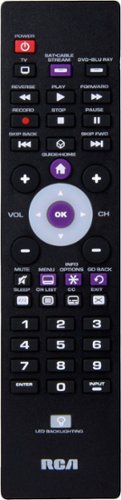
RCA - 3-Device Backlit Universal Remote - Black

With an impressive 4.3-star rating from 4,261 real users, the RCA - 3-Device Backlit Universal Remote stands out for its balance of reliability, affordability, and usability. Shoppers consistently praise its backlit buttons and easy setup, making it a go-to choice for controlling TV, streaming, and audio systems. Backed by shopper feedback with a 4.3/5 rating across 4,261 reviews.

$14.99 ★ 4.3/5 4,261 ratings
  • Controls up to 3 devices simultaneously
  • Highly rated for ease of use and reliable operation
#2 Top Choice for PS5 Owners

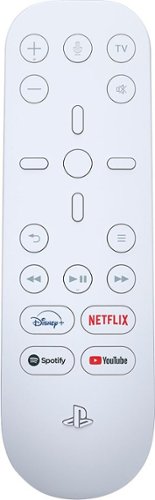
Sony - PlayStation 5 - Media Remote - White

A specialist favorite for PlayStation fans, the Sony - PlayStation 5 - Media Remote boasts a 4.6-star rating from 2,699 reviews. Users highlight its seamless PS5 integration and intuitive media controls, making it an essential accessory for anyone wanting to maximize their console experience.

$29.99 ★ 4.6/5 2,699 ratings
  • Optimized for controlling PS5 console and media apps
  • Simple, dedicated media playback controls
#3 Best Value

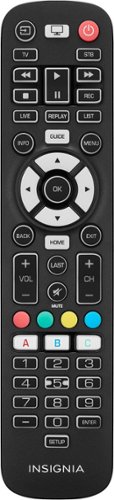
Insignia™ - 3-Device Universal Remote - Black

With over 700 positive reviews and a 4.3-star average, users call the Insignia™ - 3-Device Universal Remote a strong budget-friendly option with wide compatibility and straightforward programming.

$19.99 ★ 4.3/5 738 ratings
  • Controls up to 3 devices with simple setup
  • Praised for clear instructions and dependable performance
#4 Popular for Satellite TV

DirecTV - Universal Remote - Silver

With a robust 4.6-star rating and nearly 1,000 reviews, the DirecTV - Universal Remote is a trusted pick for satellite TV users who value responsiveness and extensive device support.

$34.99 ★ 4.3/5 958 ratings
  • Excellent support for DirecTV and other components
  • High marks for durability and straightforward operation
#5 Best for Multiple Devices

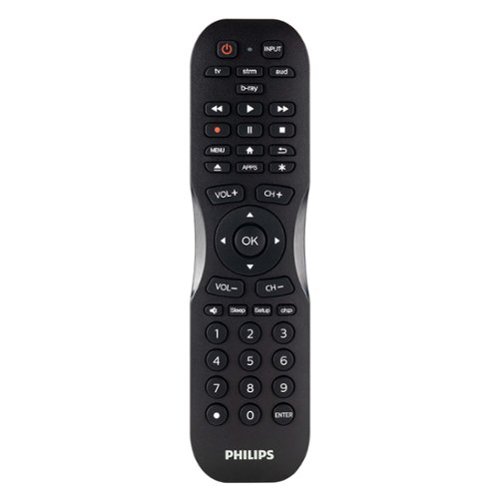
Philips - 4 Device Remote Control - Matte Black

Rated 4.2 stars by 366 reviewers, this Philips model earns praise for supporting up to 4 devices and offering robust compatibility across brands, while maintaining an accessible price point.

$19.99 ★ 4.3/5 366 ratings
  • Multi-device control (TV, DVD, Blu-ray, Streaming)
  • Noted for effective brand compatibility and ease of setup

Comparison Table

Model Best For Price Key Strength
RCA - 3-Device Backlit Universal Remote - Black Best Overall $14.99 User-friendly, backlit buttons, 4.3 rating (4,261 reviews)
Sony - PlayStation 5 - Media Remote - White PS5 Owners $29.99 Seamless PS5 integration, 4.6 stars (2,699 reviews)
Insignia™ - 3-Device Universal Remote - Black Value Seekers $19.99 Affordable, wide compatibility, 4.3 stars (738 reviews)
DirecTV - Universal Remote - Silver Satellite TV Users $34.99 Excellent DirecTV support, 4.6 stars (958 reviews)
Philips - 4 Device Remote Control - Matte Black Multi-device Households $19.99 Handles 4 devices, 4.2 rating (366 reviews)

How To Choose

What factors should I consider when choosing a universal remote control?

Firstly, identify the number and type of devices you need to control: TVs, soundbars, streaming dongles, Blu-ray players, and gaming consoles may all require unique programming. Check for compatibility with your brands and models. Next, consider how many devices each remote can control—basic models handle 2-3, while advanced ones support 6-8 or more. Ease of setup, clear instructions, backlighting for nighttime use, and ergonomic design are key for a comfortable experience. Consider user reviews: higher ratings and more reviews often signal long-term satisfaction and fewer technical headaches.

Look for remotes with pre-programmed codes and online support libraries for faster pairing.

Are there special features worth paying extra for?

Many shoppers appreciate backlit buttons, rechargeable batteries, dedicated streaming controls, and even smart home integration in higher-end models. If you have a large or complex setup, advanced programming options and macro controls—where multiple commands can be triggered by a single button—can save considerable time.

Choose rechargeable options or remotes with a long battery life for sustainability and convenience.

How do universal remotes differ in build quality and reliability?

Remotes that genuinely last tend to receive strong user endorsements, both in ratings and the number of reviews. For example, devices like the "RCA - 3-Device Backlit Universal Remote - Black" with thousands of positive reviews often outlast and outperform lesser-tested rivals. Materials, button quality, and the brand reputation all influence durability.

Inspect shopper feedback for consistent mentions of build quality and longevity before purchasing.

Can universal remotes operate streaming sticks, soundbars, or game consoles?

Yes—provided the remote supports the necessary IR/RF or Bluetooth protocols, and the device brands. For example, the "Sony - PlayStation 5 - Media Remote - White" is purpose-built for PS5 compatibility, while broader models like those from Insignia, RCA, or Philips typically list supported device types and brands.

Always double-check compatibility lists on the manufacturer's site before committing.

FAQ

Do universal remotes work with smart TVs and streaming boxes like Roku or Fire TV?

Most universal remotes support a wide range of smart TVs and popular streaming devices like Roku and Fire TV via pre-programmed or manually entered codes. However, advanced features on some proprietary devices may require brand-specific remotes. Always check the compatibility before purchase.

How do I program a universal remote control?

Programming typically involves entering manufacturer codes or using auto-search functions. Step-by-step instructions are included with most remotes, and major brands like RCA, Insignia, and Philips offer searchable online code libraries and tutorials for hassle-free setup.

Are all buttons on universal remotes customizable?

While many remotes allow you to program major buttons, full customization (such as assigning custom macros or functions to every button) is usually reserved for more expensive, advanced models. Basics like power, volume, and playback are almost always customizable.

What are the advantages of backlit universal remotes?

Backlit remotes are easier to use in low-light or home theater settings, minimizing the chance of pressing the wrong button while watching movies at night.

Can universal remotes replace lost or broken OEM (original) remotes?

Yes, universal remotes are a convenient and often more affordable replacement for lost or damaged manufacturer-specific remotes, restoring full function to your devices with minimal setup.

Frequently Asked Questions

Do universal remotes work with smart TVs and streaming boxes like Roku or Fire TV?

Most universal remotes support a wide range of smart TVs and popular streaming devices like Roku and Fire TV via pre-programmed or manually entered codes. However, advanced features on some proprietary devices may require brand-specific remotes. Always check the compatibility before purchase.

How do I program a universal remote control?

Programming typically involves entering manufacturer codes or using auto-search functions. Step-by-step instructions are included with most remotes, and major brands like RCA, Insignia, and Philips offer searchable online code libraries and tutorials for hassle-free setup.

Are all buttons on universal remotes customizable?

While many remotes allow you to program major buttons, full customization (such as assigning custom macros or functions to every button) is usually reserved for more expensive, advanced models. Basics like power, volume, and playback are almost always customizable.

What are the advantages of backlit universal remotes?

Backlit remotes are easier to use in low-light or home theater settings, minimizing the chance of pressing the wrong button while watching movies at night.

Can universal remotes replace lost or broken OEM (original) remotes?

Yes, universal remotes are a convenient and often more affordable replacement for lost or damaged manufacturer-specific remotes, restoring full function to your devices with minimal setup.

About Bestpeek Reviews

Our team of experts spends hundreds of hours researching and testing products to help you make confident purchasing decisions. We independently review everything we recommend.

Trusted Expert 2026 Updated