Last Updated: 2025-12-30 06:19:05
 Amazon
 MyOfficeInnovations
| Manufacturer | - |
|---|---|
| Brand | Canon |
| Item model number | 5952C005 |
| Color | MultiColor |
| Weight | - |
| Height | - |
| Depth | - |
| Product Id | 3060339 |
|---|---|
| User Reviews and Ratings |
5
(2 ratings)
5 out of 5 stars
|
| UPC | 013803356946 |
| # | Shop & Price | Reviews | User Ratings | Price |
|---|---|---|---|---|
| 1 |
Check on Amazon
Price:
Search
Visit
|
|||
| 2 |
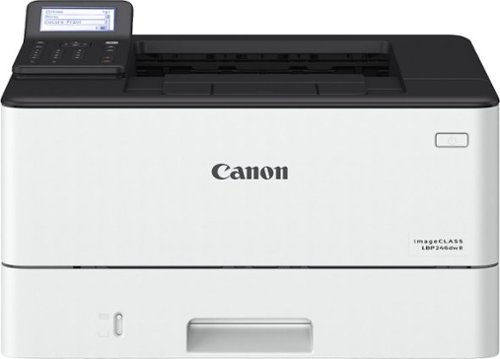
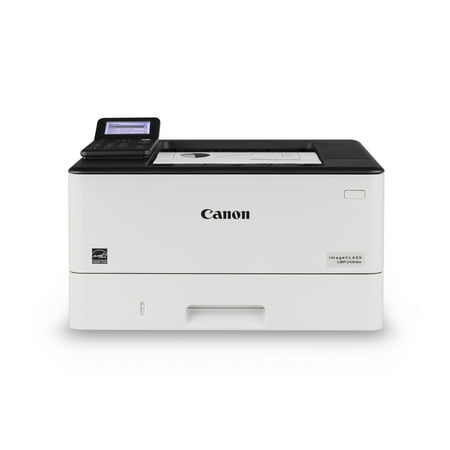
Canon imageCLASS LBP246dw - Wireless Duplex Monochrome Laser Printer
Reviews: 57
app.ratings:
(57)
Price:
$312.92
Visit
Reviews: 57
(4.7)
|
[This review was collected as part of a promotion.] I bought this printer for my home office and was very surprised how easy it was to get set up and connected. Getting the printer connected to my computer and my phone via the Apple AirPrint was very easy and got everything working in under 25 min. The printer is a lot quieter than my previous printer and I can tell the quality of the prints is much better. I'm very happy with the purchase.
[This review was collected as part of a promotion.] I'll admit that I procrastinated using the canon printer for at least a month, but the second I unboxed it it was a lot less intimidating than I had imagined. I had to do was plug-in, the power cord and connect to my Wi-Fi by entering the password. That was literally the hardest part. Then I access photos from my iPhone and hit print then voilà!
[This review was collected as part of a promotion.] Printers always give me anxiety; from having to set them up, to them not showing up on my mobile device, to crazy laptop software installations, there is always something that goes wrong. Not the case with this printer! I had the printer out of the box and set up to print in less than 10 minutes. I simply connected the included cord to the back of the printer and then plugged it in the wall. There's a power button on the front, and after powering the printer on (it will take a little while the first time it is plugged in), it walked me through setting up the date and time, as well as offering the option to connect to my Wifi, which I chose. The on screen keyboard to enter the WiFi password is definitely a little funky and I entered it incorrectly the first time so I had to start over, it was like texting on an old flip phone. But after the printer was connected to the WiFi, I checked my phone to print a test, and it immediately showed up in the list of printers available. Same thing with my laptop, just go to print something like you normally would, and then click “Add a New Printer” (or something to that effect, depending on what kind of computer you have), and it showed up. After clicking “Add”, it did some quick installation in the background which took less than a minute, and I was able to print from my laptop as well. The printer did come with a Windows installation CD, but my laptop, and a lot of the newer laptops, don't have spots for CDs, so I didn't use this at all. The printer also comes with a detailed setup guide that is very effective at visually walking you through the process. When setting the printer up, it offered the choice for a Remote UI setup, which I declined, but this would allow you to check the printer's status from your web browser, as well as change settings. It also offered a toner replenishment service, which I declined as well, but if you manage an office where people are using this printer often, then that is definitely something that you should take advantage of. The printer prints in black and white and comes with black ink and ready to print. This was another feature I appreciated, because my previous printers would come with color ink, and when all of the color ink was gone, I couldn't print in black and white. Would definitely recommend this printer for anyone who is looking for a black and white printer with no bells or whistles. It is basic, but prints quickly, is easy to set up, and connects easily to your home or office WiFi so that you can print from mobile or desktop quickly and easily.
[This review was collected as part of a promotion.] Solid printer and gets the job done. Installation on printers has gotten a bit more complicated with apps instead of a cable, but that clearly gives some mobility benefits. I wouldn't recommend any wireless printer for an older individual with limited computer skills unless they have someone to assist with setup. That being said, the benefits of not having to use a cord are quite nice. Prints fine. Uses lasers, so I'm fairly sure I could demolish it in times of an apocalypse and use it for home defense. So... That's nice.
[This review was collected as part of a promotion.] This printer is great. I love how it has professional quality. This printer can print multiple sheets at a time. I'm looking forward to using this printer to print out recipes for a hole made cookbook that I'm going to make. The only thing that I don't like is that it doesn't print in color but I love the printer. It prints quickly and efficiently.
Loading reviews...
Products you might like
Loading related products...

 日本
日本 US
US