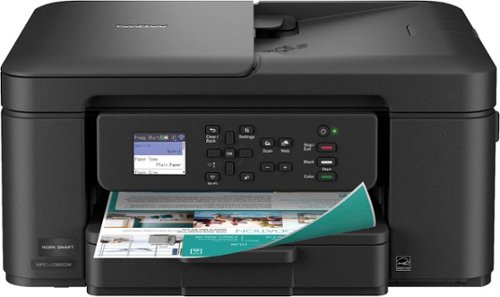
Brother - Work Smart 1360 Wireless All-in-One Refresh Subscription Eligible Inkjet Printer with Auto Duplex Printing (MFC-J1360DW) - Black

Brother - Work Smart 1360 Wireless All-in-One Refresh Subscription Eligible Inkjet Printer with Auto Duplex Printing (MFC-J1360DW) - Black
(1)
3 stores
2 Products

Product Details

The Brother Work Smart 1360 Wireless All-in-One Refresh Subscription Eligible Inkjet Printer is the perfect choice for a reliable printer with robust efficiency-boosting features. With tools like automatic duplex (2-sided) printing, a 20-page single-sided automatic document feeder(1), and wireless(2) and Cloud connectivity(3) options available on the 1.8” color display, this multifunction printer helps you get your work done with simplicity and ease. Perfect for printing anything from to-do lists to business reports, this color inkjet printer outputs quality prints at fast speeds. Brother Page Gauge(4) monitors your ink usage so you know when you’re running low. When paired with the Brother Mobile Connect app(5), setup is quick and easy – plus, you’ll be able to print from virtually anywhere on your mobile device(6). Print Confidently with Brother Genuine LC501 Ink in your Brother Work Smart 1360 for reliable, consistent prints –it’s the only brand we recommend for your Brother printer.

Shop Now

Compare Buying Options

Last Updated: 2025-10-09 01:07:27

Search
Amazon Amazon

$89.99
bbuy Brother

$142.88
walmart Beach Audio Inc

Product Specifications

Technical Details

Manufacturer -
Brand -
Item model number -
Color -
Weight -
Height -
Depth -

Additional Product Information

Product Id 3045004
User Reviews and Ratings
3 (1 ratings)
3 out of 5 stars
UPC 012502679721

Description

Looking for reliable printing with robust efficiency-boosting features? The Brother Work Smart 1360 Wireless Color Inkjet All-in-One Printer delivers. With versatile tools like automatic duplex (2-sided) printing, a 20-page single-sided automatic document feeder¹, and wireless² and Cloud connectivity³ options available on the 1.8” color display, this multifunction printer makes getting your work done simple. Perfect for printing anything you need, from to-do lists to business reports, this color inkjet printer outputs vibrant colors and bold, rich blacks at fast print speeds, and Page Gauge⁴ monitors your ink usage so you know when you’re running low. When paired with the Brother Mobile Connect app,⁵ setup is quick and easy – plus, you can print from virtually anywhere on your mobile device.⁶ Print Confidently with Brother Genuine LC501 Ink in your Work Smart 1360 for reliable, consistent prints –the only brand we recommend for your Brother printer.
All-in-One Printer: Get all your work done with a multifunction printer. Print, copy, and scan on one convenient, compact printer, with quick and easy setup. Easy to Use with Cloud App Connections: Print from and scan to popular Cloud apps³, including Google Drive™, Dropbox, Box, OneDrive, and more from the simple to use 1.8” color display on your printer. Productivity-Focused Printing Features: This printer includes automatic duplex (2-sided) printing, a 20-sheet single-sided Automatic Document Feeder (ADF)¹, and a 150-sheet paper tray.¹ Multiple Connection Options: Connect your way. Interface with your printer on your wireless network² or via USB. The Brother Mobile Connect app: Put the power of printing at your fingertips. Go mobile with the simple-to-use Brother Mobile Connect app⁵ that delivers easy onscreen menu navigation for printing, copying, scanning, and device management from your mobile device. Fast Print Speeds: Efficiency is the name of the game. Engineered to print at fast speeds of up to 16 pages per minute (ppm) in black and up to 9 ppm in color⁷. Reliable Print Quality: Crisp, clear printing. Brother inkjet printers produce beautiful prints in vibrant color or rich black & white for results you can be proud of. Page Gauge: Monitor your ink usage to help ensure you don’t run out⁴. Customer Support: For customer service, visit us at www.brother-usa.com/support Brother Genuine Ink: Reliable performance you can count on. We engineer our ink cartridges to work seamlessly with your Brother printer. Choose Brother Genuine LC501 Ink, the only brand we recommend for use with your printer. Included in the box: Brother MFC-J1360DW, Starter Black Ink Cartridge (200 pages)14, Starter Cyan, Magenta, Yellow Ink Cartridges (200 pages)14, AC Power Cord, Product Safety Guide, Reference Guide, Warranty Card, Quick Setup Guide Condition: New Disclaimers 1. Maximum Capacity based on using 20lb. paper. 2. Wireless connection required. 3. Requires an internet connection and an account with desired service. 4. Page Gauge is an estimate for informational purposes only. For actual cartridge yield information refer to go.brother/pageyield. 5. Free app download & wireless connection required. Compatibility may vary by device and operating system. 6. Free Brother Mobile Connect App download, wireless connection and connection of an eligible printer with Brother are required. Compatibility may vary by device, operating system and country. 7. Based on ISO/IEC 24734 (after first set of ISO test pages). For inkjet print speed methodology, please visit www.brother-usa.com/printspeed.

Shopping Options

Compare Buying Options

# Shop & Price
1
Check on Amazon
Price:
Search Visit Amazon
2
Brother - Work Smart 1360 Wireless All-in-One Refresh Subscription Eligible Inkjet Printer with Auto Duplex Printing (MFC-J1360DW) - Black
Reviews: 34
app.ratings: (34)
Price:
$89.99 Visit bbuy
3
Brother Work Smart 1360 MFC-J1360DW Wireless Color Inkjet All-in-One Printer with Automatic Duplex Printing and 1.8” Color Display
Reviews: 4
app.ratings: (4)
Price:
$142.88 Visit walmart

Top User Reviews and Ratings (10 total reviews)

(5)
Reviewed in the USA on Oct 04, 2025

I use a linux operating system on my computers and was having problems with getting certain brands to function , based on linux community recommendations 2 of the brands Walmart sells work great for my purpose.

Anonymous • Review provider: walmart.com
(4)
Reviewed in the USA on Sep 30, 2025

Works as expected. Very user and computer friendly. Only problem is trying to use Wi-Fi for remote printing on my phone. Other wise a very reliable and user friendly printer. Prints clear and very readable printouts.

Anonymous • Review provider: walmart.com
(3)
Reviewed in the USA on Sep 19, 2025

In a way this is hard to give star ratings to, because I've had a couple years of experience with the same model that I bought for a different location. And I've generally been so pleased with that one that it's why I bought another one for a different location -- the one being reviewed here. And this one is inferior to my first Brother MFC-J1010DW in a couple ways: The first is print quality, which is really crisp on the first one, but noticeably less so on this one. I've compared printouts of the same document side by side, from the two different units. Same paper, Brother Genuine Ink for both. And I did go through all the print-quality-check functions on the new unit. Second issue: On the new unit, the control panel buttons are kind of hard to press -- some particularly so, such as the direction arrows that you need for entering various commands (including for the aforementioned print quality tests). In fact, these keys are so tight on the new unit that I have to use two hands -- my left hand holding the control panel in the up position while I press the command arrows and keys with my right hand. While on the unit I bought a couple years ago, all the buttons are easy to press, but still with a quality feel and response. It's not so much that the new unit reviewed here is "bad" as that the first one I bought is definitely better. I wouldn't hesitate giving the older one five stars, especially relative to the price. On both units I really enjoy the easy two-sided printing and generous-capacity paper tray, among other features. Too bad Bother's quality control is either inconsistent, or this model's quality has declined over the last few years for the MFC-J1010DW.

Anonymous • Review provider: walmart.com
(5)
Reviewed in the USA on Sep 19, 2025

The only thing in the setup- it doesn't give you instructions on how to put your network password in the printer. Easy enough to find through the control panel.

Anonymous • Review provider: walmart.com
(5)
Reviewed in the USA on Aug 29, 2025

This printer is very nice! I set it up easily and seen how it test printed which was really good. I am pleased to have a new printer that will work best for me. Although during shipping when it arrive to me, the box was damaged I will this printer is very nice! I set it up easily and seen how it test printed which was really good. I am pleased to have a new printer that will work best for me. Although during shipping when it arrive to me, the box was damaged. I took photos for reference, which made me feel uneasy that the printer would be able to work. But fortunately, when setting it up it printed out for i took photos for reference, which made me feel uneasy that the printer would be able to work. But fortunately, when setting it up it printed out for f flawlessly.

Anonymous • Review provider: walmart.com
Showing 1 to 5 of 10 reviews
1