Brother - INKvestment MFC-J6955DW Wireless Color All-In-One Supertank Inkjet Printer, Best for Office - White

Brother - INKvestment MFC-J6955DW Wireless Color All-In-One Supertank Inkjet Printer, Best for Office - White
(1)
3 stores
2 Products

Product Details

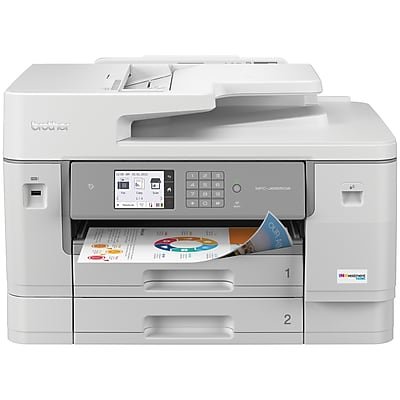
Powered by Brother MAXIDRIVE Inkjet Technology, this dynamic printer delivers super sharp images, text, and graphics at print speeds up to 30 pages per minute‡, black and color. Print, scan, fax and copy up to 11”x17" (Ledger) size paper. The advantage of the MFC-J6955DW is that it offers a second paper tray for a 500-sheet total paper tray capacity, plus single pass duplex copy and scan capabilities. Triple Layer Security features help safeguard sensitive documents while printing and use the NFC card reader for easy badge authentication.

Shop Now

Compare Buying Options

Last Updated: 2026-01-05 22:42:00

Search
Amazon Amazon

$461.57
bbuy Brother

$469.99
walmart Walmart.com

Product Specifications

Technical Details

Manufacturer -
Brand -
Item model number -
Color -
Weight -
Height -
Depth -

Additional Product Information

Product Id 3199476
User Reviews and Ratings
3 (1 ratings)
3 out of 5 stars
UPC 012502665526

Description

You can INK BIG with MFC-J6955DW Brother INKvestment Tank color inkjet all-in-one Printer, complete with up to 1 year of Ink in-box(1). Powered by Brother MAXIDRIVE Inkjet Technology, this dynamic printer delivers super sharp images, text, and graphics at print speeds up to 30 pages per minute(2), black and color. Print, scan, fax and copy up to 11”x17" (Ledger) size paper. The advantage of the MFC-J6955DW is that it offers a second paper tray for a 500-sheet total paper tray capacity, plus single pass duplex copy and scan capabilities. Triple Layer Security features help safeguard sensitive documents while printing and use the NFC card reader for easy badge authentication.
Reliable printing that lasts…with up to 1 year of ink in-box(1). Start printing and keep printing for a long, long time with up to 1 year of ink in box(1). Brother INKvestment tanks are bottle-free – no fuss, no mess. Features MAXIDRIVE Inkjet Technology. Brother’s next generation of inkjet printing technology. Completely re-engineered from chip to print-head, the MFC-J6955DW features our fastest INKvestment tank print speeds – up to 30 ppm(2) (black and color). Our redesigned print head is built for durability and uniform printing, even with long-term use. Keep your business documents secure. Triple Layer Security features help create secure connections to the printer and network, safeguarding sensitive documents while printing. Includes an integrated NFC card reader for easy badge authentication. Versatile as you need – print, copy, scan, fax up to 11”x17” (Ledger) size paper. Print from the dual, 250-sheet capacity paper trays or use the 100-sheet multipurpose tray to print on envelopes, cardstock and other specialty papers. Help save time with single-pass duplex copy and scan with a 50-page capacity automatic document feeder(3). Work your way connectivity. Use built-in dual band wireless (2.4GHz / 5GHz)(4), Wi-Fi Direct®, connect via Ethernet, or connect to a single computer through a USB cable. Works with Amazon Alexa. Print on the go. Print, scan, and manage your printer from almost anywhere when connected through a wireless network using the Brother Mobile Connect App(5). Intuitive Cloud Connection. Print-from and scan-to popular cloud apps including Dropbox, Google Drive™, Evernote, OneNote and more(6) directly from the 3.5" color touchscreen. Save time by creating custom shortcuts right on the screen for your frequently used features. Eco-friendly features. EPEAT® Silver and ENERGY STAR® certified with eco-friendly options like Eco Mode and Ink Save Mode. Plus, automatic duplex printing helps reduce paper use. Print confidently with Brother Genuine Ink. Brother Genuine Ink is engineered to perform optimally with your Brother INKvestment printer, to ensure smooth and reliable printing with vivid colors and sharp images. So, you can print confidently every time. At Your Side support. Backed by Brother with a 2-year limited warranty, plus free online or live chat support for the life of your Brother printer. Disclaimers: 1. Based on average monthly print volumes of approximately 300 pages at 60% black pages / 40% color pages in accordance with ISO/IEC 24711 using 4 cartridges provided in-box. For more page yield information, see www.brother.com/pageyield. 2. ISO print speed based on ISO/IEC 24734 (after first set of ISO test pages). For more details, please visit www.brother-usa.com/printspeed. 3. Maximum capacity based on using 20 lb. paper. 4. Requires an Internet connection. 5. Requires connection to a wireless network. Brother Mobile Connect free app download is not available in all countries. 6. Requires an Internet connection and an account with desired service.

Shopping Options

Compare Buying Options

# Shop & Price
1
Check on Amazon
Price:
Search Visit Amazon
2
Brother - INKvestment MFC-J6955DW Wireless Color All-In-One Supertank Inkjet Printer, Best for Office - White
Price:
$461.57 Visit bbuy
3
Brother MFC-J6955DW INKvestment Tank Color Inkjet All-in-One Printer with Wireless, Duplex Printing, 11” x 17” Scan Glass and Up to 1-Year of Ink In-box
Reviews: 230
app.ratings: (230)
Price:
$469.99 Visit walmart

Top User Reviews and Ratings (10 total reviews)

(3)
Reviewed in the USA on Dec 09, 2025

The 6955 is billed as an improvement and advanced above the 6935. That is far from true. I rue the upgrade. My 6935 could and did scan more diverse sizes through the feeder, and had a much better scan quality.

Anonymous • Review provider: walmart.com
(5)
Reviewed in the USA on May 16, 2025

The J6955DW is the Swiss Army knife of affordable 11x17 printers, perfect for small businesses or home. I have been buying Brother 11x17 printers for well over a decade. I get at least 5 years out of them, and they haven't disappointed me yet. I am running about 4-5 of them at any given time, right now, 4 at work and 1 at home. I have never had a mechanical failure, what usually wears out is common to all desktop printers - the rubber rollers get too glossy and the feed jams. It would be nice if it were easy to buy the rollers, but after 5-10 years, it is just easier to buy the newer models. Here is a SERIOUS warning though - Aftermarket refill cartridges are risky. Some will work, some will screw the printhead up to the point it cannot be cleaned. We have also bought HP and Epson printers, but we always have more trouble with them than the Brothers.

Anonymous • Review provider: walmart.com
(5)
Reviewed in the USA on Jan 11, 2025

Works as advertised. Few issues with clogged ink but the one time it happened, it was fixed with a single print head clean. Works fast, love the profile of the paper rotated 90deg compared to traditional inkjet printers which saves space on the footprint where I have this printer sitting. So far, it has been a great product compared to my previous non-Brother printer.

Anonymous • Review provider: walmart.com
(1)
Reviewed in the USA on Dec 11, 2024

Printer does as expected when you can connect to it. I upgraded from previous Brother MFC printer that I've had since 2012, and it was a relatively issue free machine. This one though I totally hate, it isn't the machine itself per se, it's the software and connectivity. The software on this thing blows, I cannot connect to it EVER on the first try. I use it for multiple computers and if I try to print anything it never works. I have to go around to every computer to it to make sure there are no other docs left in the print tray, or that someone didn't send a doc to print then put away their laptop before it was finished thereby breaking the connection and leaving the printer in limbo. Some days it takes over an hour just to get it to print a doc, which usually consists of uninstalling then reinstalling the printer from the device list, checking and rechecking settings, 12 failed attempts before I finally email the doc to a computer where I can transfer it to a USB device then carry it to the printer and print from file, I have to do this because the one is and enterprise computer and memory devices are blocked The connection repair tool blows too. I run it and it will not allow me to manually input an IP address for the printer. My network starts off with something other than the 169.254 that the software is set at, AND IT WILL NOT LET YOU PUT IN AN IP ADDRESS MANUALLY, so the network repair tool is useless. There is constantly an update icon in the tray on my computer for this machine, even after I finally waste half an afternoon getting it to respond to the computer and run all the updates. Then when I try to use it the next hour, day, week, or whatever I have to jump through all those hoops again. Don't buy this machine if you do not want to spend countless hours trying to get it to print a simple document.

Anonymous • Review provider: walmart.com
(5)
Reviewed in the USA on Dec 10, 2024

i loove the machine!!

Anonymous • Review provider: walmart.com
Showing 1 to 5 of 10 reviews
1